Archives for posts with tag: youtube
Image of George Orwell by Gordon Johnson from Pixabay

“Any sufficiently advanced technology is indistinguishable from magic” – Arthur C. Clarke.

In a remarkable about face for a technology company, Amazon has confirmed that it is moving away from its “just walk out” technology at its Amazon Fresh stores. The technology boasted that it used a mixture of cameras, sensors, and artificial intelligence (A.I.) to know what consumers had put in their baskets and to accurately bill its customers without all that tedious checking out and interacting with another human being at the grocery store.

Image Copyright Amazon.com used under fair use for criticism, comment, or news reporting.

What was actually happening was that up to 1,000 people in India were watching and tagging videos to ensure that customers were billed correctly. Amazon has apparently laid off almost its entire development team of this “technology” and will start to phase out this service from its existing Amazon Fresh stores. This is all the more surprising after Amazon’s experience with A.I. recruitment. In 2015 Amazon had to abandon an A.I. résumé reading project due to being unable to stop it from discriminating against women. It was seen by many as a humiliating comedown for the tech giant.

Image Copyright Amazon.com used under fair use for criticism, comment, or news reporting.

“Pay no attention to that man behind the curtain!” — The Wonderful Wizard of Oz, L.Frank Baum.

While many will smirk at Amazon’s second major public A.I. failure, and I have to admit to being one of those people, there is a bigger issue here which Amazon should be commended for. It is the lifting the vail on A.I. tools that are not some magic that comes out of the ether. They often require human intervention to be usable- both in front and behind the keyboard. In addition A.I., or more accurately Machine Learning , need examples of human labor in the thousands, if not millions, to be trained. The training of these A.I. “models” has become a contentious subject for those with an interest in A.I. both as supporters and critics.   

“Any technology distinguishable from magic is insufficiently advanced” – Barry Gehm’s corollary to Arthur C. Clarke’s original quote.

The main issue with machine learning is that the A.I. industry, almost without exception, sees art, music, writing, film, and pretty much the entire internet as fair game for training A.I. models, which they in turn sell to us in the guise of generative A.I. Those of us on the other side (waves hand in air to indicate exactly where I stand on this subject in case you had not already guessed) say that copyright does not work that way. Derivative works are still derivative.

 It is indeed hilarious to watch companies such as Disney try to navigate this brave new world. On the one hand, Disney has tried to argue that generative A.I. is fine for them to use to create new works based on the work of artists they have employed in the past. But Disney has then complained about possible copyright infringement when someone else has tried the same trick with copyrighted works they own.

Image Copyright Walt Disney Company used under fair use for criticism, comment, or news reporting.

The lawyer who used ChatGPT to write a legal brief might want the machines to infringe a bit more. To his cost, literally, the lawyer found out that the pesky machine had just made up all the cases that it sited in its argument which he signed his name to. He was sanctioned and fined after he was found out. I just love that generative A.I. tools hallucinate (the developers term, not mine).

One of my favorite activities these days is to ask A.I. peddlers what they use to train their models. Indeed, I had a most entertaining afternoon doing just that at this year’s Western Veterinary Conference. Amongst the answers I received were “none of your business – who are you” (my favorite), “medical records from a university,” and “the internet.” None of the vendors I spoke to were willing to discuss privacy, copyright, or what happens if they are no longer allowed to train their models that way. One gets the distinct impression of building on borrowed land.

The latest darling of the A.I. generation tools is Sora, which creates beautiful full motion video from text prompts and is from the OpenAI stable. However, in a recent interview with the Wallstreet Journal, Mira Murati, OpenAI’s Chief Technology Officer, refused to answer questions about where Sora’s data set for modeling came from. Murati also refused to say whether the data set that Sora used included YouTube and Instagram videos – stating that she “did not know.” That in turn has led to some serious questions about licensing, as YouTube’s CEO Neal Mohan, confirmed that OpenAI using YouTube content for modeling purposes would be a violation of YouTube’s terms of service.  

“Thou shall not make a machine in the likeness of a human mind” – Dune, Frank Herbert

There is a temptation to label those who speak out about our current infatuation with A.I. tools and criticize the foundations those tools are built on as luddites. While our current use of the word brings to mind hoards of unemployed mill workers bent on smashing “the spinning jenny,” the truth about the Luddites is actually far more nuanced and carries a message for today.  The Luddites did not hate all machines, they in fact were fine with most and just wanted them run by workers who had gone through apprenticeships and were paid decent wages. The Luddites main concern were manufacturers who used machines in “a fraudulent and deceitful manner” notes Kevin Binfield in his book “Writings of the Luddites.” Outsourcing the cashing out of grocery shopping to a developing country, and labeling it as new technology, is a tactic the Luddites would have been all too familiar with and would have been happy to march against.

While I am not advocating for a Butlerian Jihad as Herbert described as the backdrop for Dune, there is merit in the context he provides to the proscription on thinking machines.

“Once men turned their thinking over to machines in the hope that this would set them free. But that only permitted other men with machines to enslave them.” – Dune, Frank Herbert.

As author SJ Sindu wrote on Twitter (I refuse to call it X on general principles); “We don’t need AI to make art. We need AI to write emails and clean the house and deliver the groceries so humans can make more art.”

A.I. art needs human art to model itself on and the pushback from artists and consumers is already significant. When the argument over modeling reaches the courts, the damage may already be done. Only then will we see the parallels between the creative arts and A.I. that we saw in the 2000s with Napster / Pirate Bay and music. Will it be too late to put this tool back in its box?

A healthy skepticism when it comes to A.I., I think is all important. And not just a skepticism for what A.I. can do but for the intentions of those that wield it.

A.I. will need to be “open” and not just open as in the name of a for profit corporation. Its models will need to be transparent and be able to be questioned. As I wrote about in my review of Hilke Schellmann’s book on A.I. in hiring and Human Resources “The Algorithm”; …it is often difficult to impossible for candidates or employees to challenge decisions by managers which they may feel have been affected by bias. How much more difficult is it when it is not a human making the decision or recommendation? A tool of which we cannot ask the most basic of questions: what were you thinking?

Footnotes and links would be a great start. But most generative A.I. companies consider this proprietary information and therefore refuse to provide what would seem a most obvious step when it comes to trust. That, in fact, is exactly why authors use footnotes and links, to allow others to follow their thinking on how they reached their conclusions. I’ve tried to add as many links and footnotes as I can to this article without becoming burdensome.

I am not a Luddite in the modern sense, but I do share a lot of the same concerns of the Luddites of old. We only need to look at our world to see why we should be concerned. It is a world where poor people in the developing world watch us shop so that we can pretend we are living in a magic future where machines do all the work. Where the drudgery of making art has been taken away from us so it can be sold back to us by corporations owned by billionaires.

I’m not sure I want A.I. to write my emails, but I can think of plenty of things that I’d like it to undertake. I already use it in a number of ways. I’ve used A.I. images in my books (although I probably will not do so in the future). I currently feel that A.I. has to earn its place in my world by proving its benefits not just to me, but the world as a whole. Will the undertakings of A.I. be for the benefit of people? Currently, that seems to be the last thing on the developers’ minds.

“The tune had been haunting London for weeks past. It was one of countless similar songs published for the benefit of the proles by a sub-section of the Music Department. The words of these songs were composed without any human intervention whatever on an instrument known as a versificator. But the woman sang so tunefully as to turn the dreadful rubbish into an almost pleasant sound.” – 1984, George Orwell
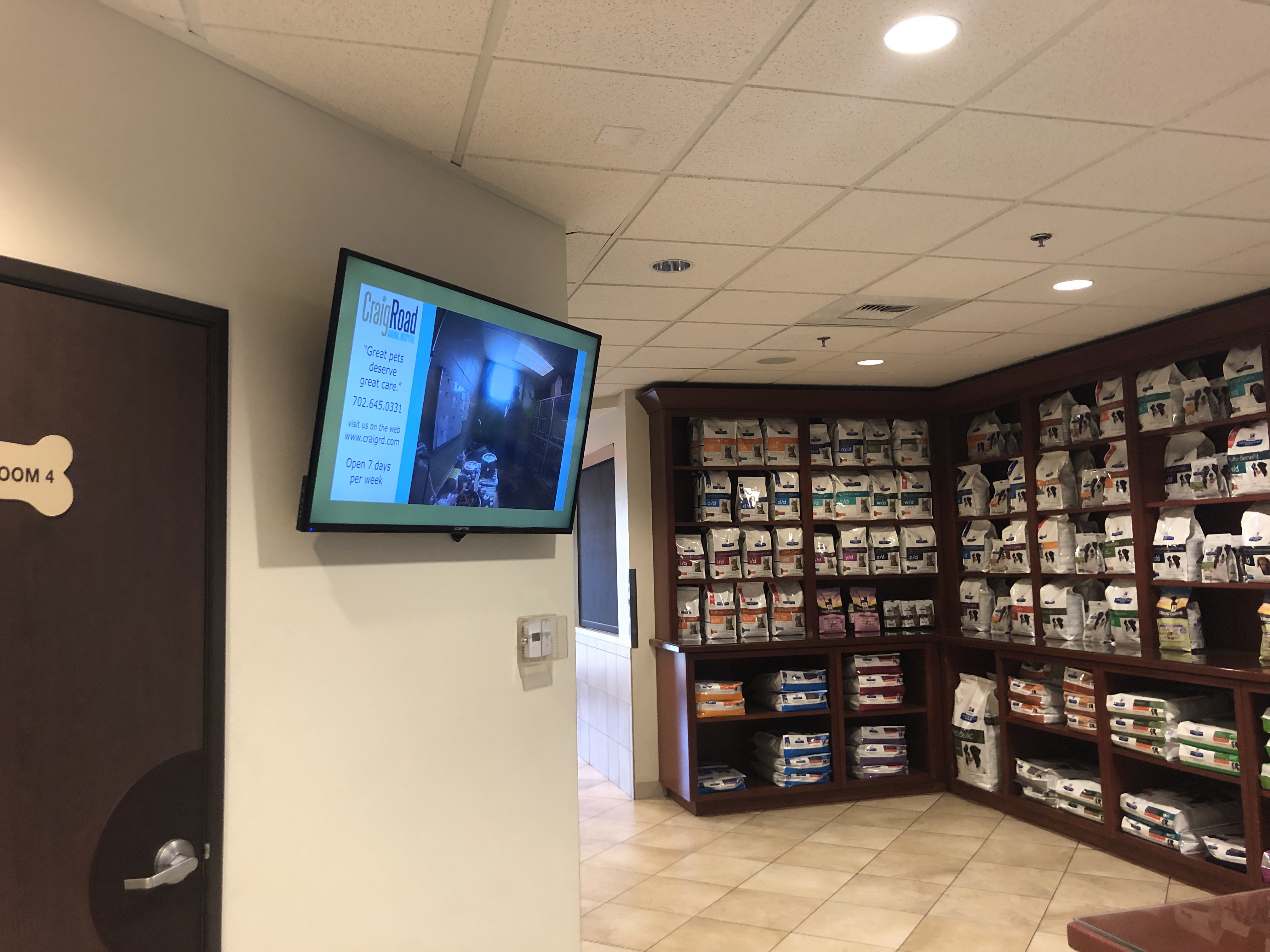
Digital signage is something I have embraced more and more over the years and this post is an attempt to share some of those technological solutions. Managing multiple veterinary hospitals, these solutions are obviously geared towards the needs of the veterinary hospitals as are the pictured examples; however, these examples will also work with any business trying to achieve the same goals. I also only use PCs; however, most of these solutions should work with Macs or other platforms.

Delivering Video Content

The simplest and cheapest way I have found to deliver video content is to use Apple TVs. These are a simple “set top” boxes that allow for the streaming of video content from the internet or from a networked server computer running iTunes. Please note this would not be your main network server, although I guess is could be, but is more likely just be a conveniently located computer running iTunes that acts as a content server. A monitor can just be plugged into the Apple TV using an HDMI cable and the Apple TV can access the network via an ethernet cable or Wi-Fi (I would recommend the ethernet cable.)

Apple TV
Rear of the Apple TV

For example, a playlist of video content can be created on YouTube and then streamed to the Apple TV. Alternatively, content is stored on a local computer, categorized Music Videos instead of Home Videos, and then put in a playlist. The playlist can then be selected, on repeat, from the “computer” icon in the Apple TV setup and then streamed.

Please note that you should always have permission, or own the content, that you are displaying to the public for copyright reasons.

Theses days most “Smart TVs” have a built in YouTube app meaning it is possible to not use the Apple TV boxes at all and just stream directly from YouTube. YouTube allows for the creation of playlists and content can be unlisted so that only those that are logged into your account or who have a direct link can video those videos. The downside to this is that it means uploading all content and then continuously streaming it from the internet. That’s a lot of bandwidth and time moving around very large files. It obviously also means replying on an internet connection for delivery and an outside service which may change its policies on advertising at any time.

The upside to streaming content like this is that multiple new playlists can be created from a central location and then played back whenever ready from the display using the Apple TV remote or the smart TV remote.

The downside to using streaming, whether directly to a smart TV or to an Apple TV box and then a to a display is that multiple displays cannot be synced. In my experience this is not a problem for most applications, but if having the same thing displaying on multiple displays at the same time is important then combining an Apple TV system with a Wolfpack system (see below) will achieve this.  

Displaying a Computer Screen

Many computer programs have dashboards, censuses, electronic whiteboards, PowerPoint, or even just CCTV feeds that it would be helpful to displayed around a building. One can obviously just use individual computers and monitors for this job. However, this can be expensive in terms of software and hardware, and often is just not ergonomically satisfying due to the size of the PC and needing a mouse and keyboard to make changes and general maintenance.

Using individual computers to run displays from Practice Management Software (PMS)

HMDI over ethernet is a possible solution. There are a few different systems out there, but I really like the Wolfpack system from HDTV Supply.

The Wolfpack Matrix Switcher with Transmitter and Receiver boxes

The Wolfpack system does not send HDMI signals over a building’s network, rather it converts HDMI signals to Ethernet and then back again. A central matrix switch allows the administrator to route inputs to outputs as needed.

A Computer running PMS displayed at multiple locations using the Wolfpack system

As you can see in the above image, the display HDMI signal from a computer is sent to a Wolfpack transmitter box and converted so it can run over Ethernet. In turn, this Ethernet cable is plugged into the matrix switch which then sends the signal to as many receivers as needed. Each outlet will need its own Ethernet cable / route. These Ethernet outputs are then plugged into Wolfpack receiver boxes and converted back into HDMI which can then be plugged into the displays.

If setting up a system like this, I strongly recommend having a display local to the computer rather than just replying on the remote displays. This can be achieved by having a second video card in the computer or by having an additional Wolfpack receiver box and monitor where the computer is.

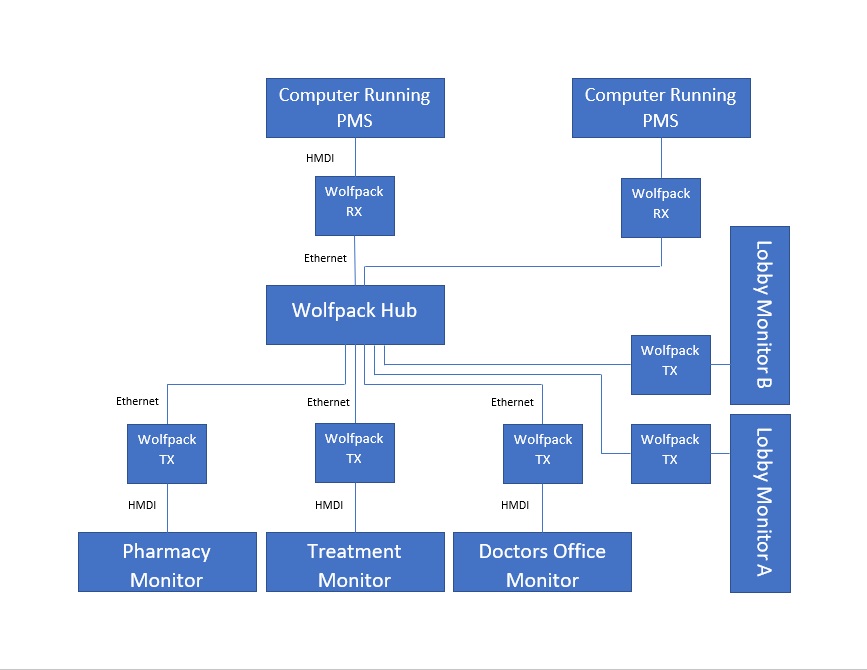
A more complicated wolfpack system with two different computers displaying different information from the PMS to multiple locations

These systems are extremely flexible, but please be aware that since each display requires its own Ethernet route existing ethernet lines can get used up fast and therefore cause problems for your traditional computer network. Another advantage of this system is that adding a new display is only as expensive as the display itself and a new receiver box.

It is possible to combine both the Apple TV system and the Wolfpack system to allow for content displays to display the same content in sync with each other. The HDMI output of the Apple TV plugs into a Wolfpack transmitter box and from there the signal is routed to Wolfpack receiver boxes and the attached displays. Again, I would strongly recommend if setting up a system like this to have a display local to the Apple TV for setup and maintenance purposes.

Screen Savers as Digital Signage    

Although the need for screen savers on modern computers is not longer the requirement it once was, the tools offered by screen savers on individual PCs makes for great static digital signage. Images, not video as of this writing, can be displayed sequentially or in a random order on some or all of a building’s computers. Indeed, it is even possible to have multiple different sequences running on different computers depending on the companies needs or where those computers are in the building itself. The huge advantage of using screen savers is that there is no hardware or software to be purchased; the screens and computers already exist.

Screen savers as digital signage also has the added advantage of the simplicity of using images and is therefore a great starting point for beginners trying to introduce other team members to the benefits of using digital signage.

Screen savers being used to display new employee information throughout the building

The way to achieve screen saver digital signage is to use the “photo” screen saver tool on each individual computer. This is time consuming but only needs to be done once. The photo screen saver tool is generally found under “settings” and then “display” on PCs and needs to point to a folder on the network, preferably the server, that contains the images to be displayed. Windows, displays images in numerical and / or alphabetical order of the file name. If a particular order is needed, then the naming convention of the images in the folder needs to be considered. To have a separate set of images for a different set of computers or area of the building simply have second folder and point those computers screen savers to that location on the network.

Screen savers in an exam room being used to deliver marketing information while clients wait

With a probably configured system, adding new images into the screen saver is merely a matter of dropping new images into the correct folder. To remove images, just remove them from the folder. A discussion of what is trying to be achieved is probably worth having with the network administrator or IT vendor as the networked folder for the images will probably require access adjustments.

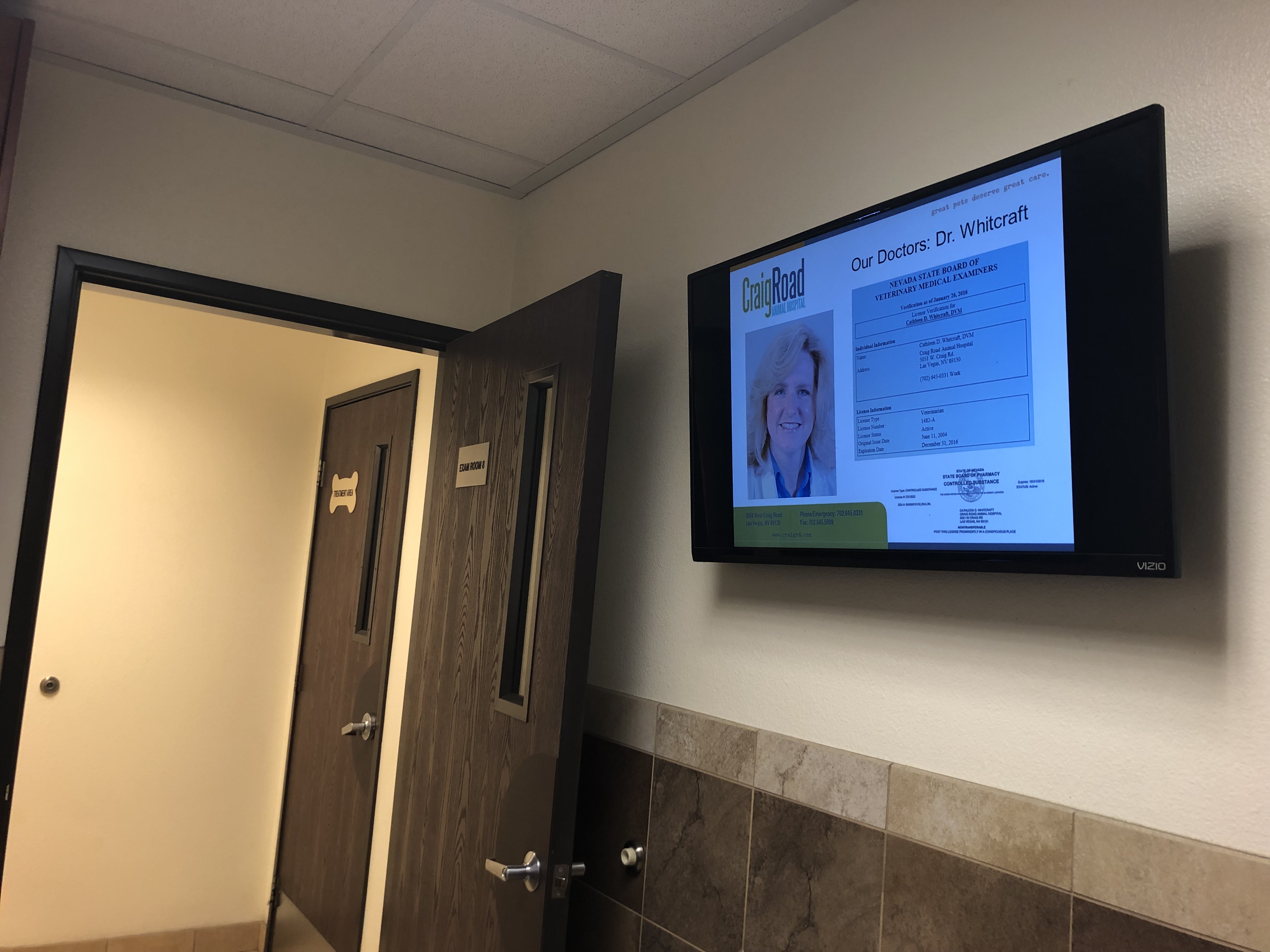
Screen savers being used to deliver staff bios to clients in an exam room

Pro tip – getting the speed at which images change, particularly if those images contain a lot of text can be tricky. Most screen saver tools just have slow medium or fast as options. However, duplicating images and giving them sequential file names (1a.jpg and 1b.jpg for example) will allow for an increase in the time spent on any one image. Please note this does not work if the photos are being displayed in a random order.

Digital signage is a great dynamic tool; however, it is only as good as the content that is displayed on it. Consideration as to what is going to be displayed, how it is going to generated, and who is responsible for updating are all key questions that need answered before jumping into the world of digital signage.  

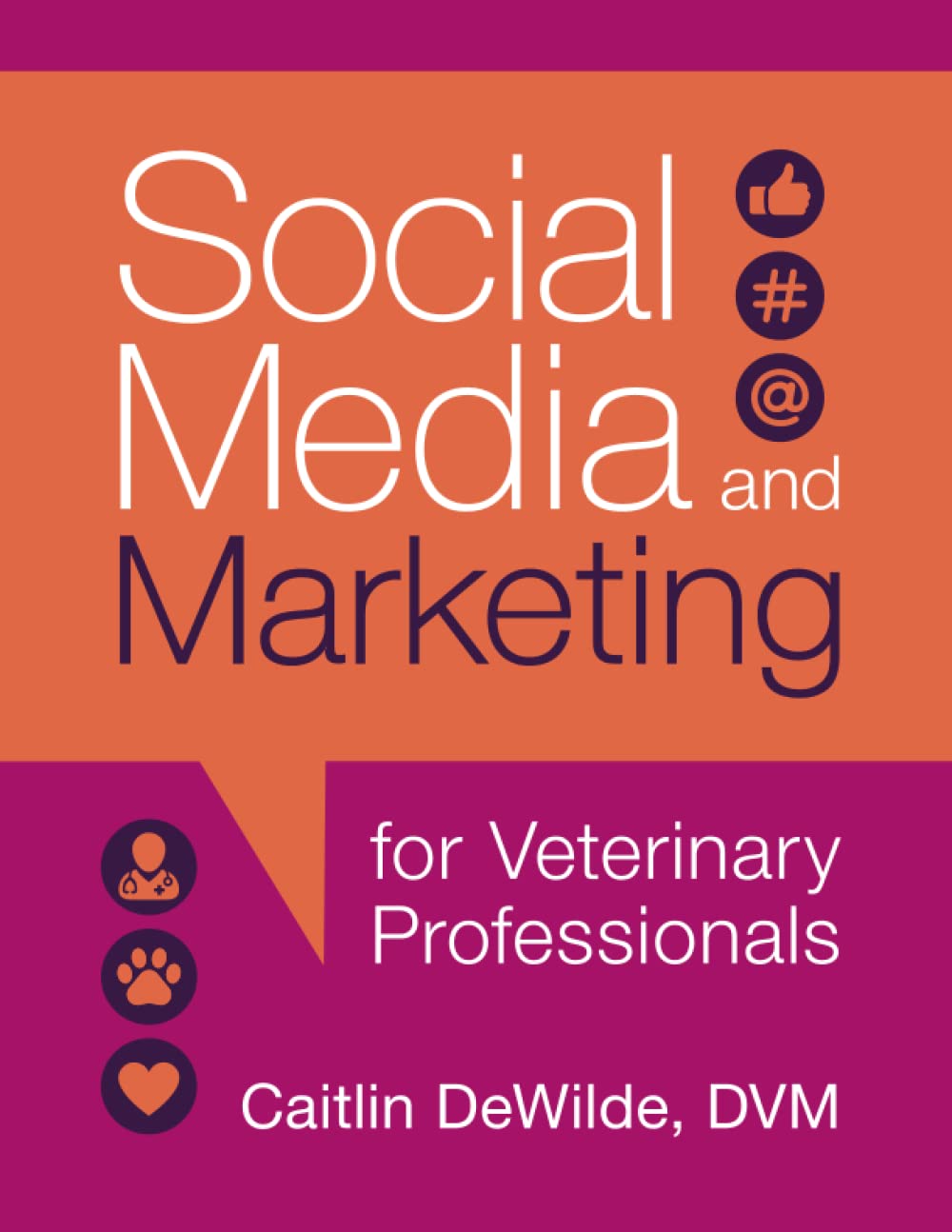
Writing an accessible and thorough book about a complex and everchanging subject, such as social media, is a daunting prospect – particularly when your audience is a niche one such as veterinary medicine. Dr. Caitlin DeWilde; however, has done just that.

With the look and feel of a textbook, but the format a “Dummies” or “Idiots how to” book, Social Media and Marketing for Veterinary Professionals is a how to guide to all the major Social Media platforms and to all the tasks needing to be understood for someone who is not a marketing professional or even someone that interested in social media or reviews.

With chapters dedicated to each of the major platforms making up the first half of the book this can at times feel redundant; however, the thoroughness will be welcomed by those feeling out of their depth in a brand-new field and the dedication to not making assumptions is more than admirable. The second half of the book is a much more interesting read for the existing user, touching on issues such as retargeting (when online ads seem to follow you around the internet), review bombing, return on investment (ROI), and general advertising strategies both online and in print ads.

Filled with footnotes, the book is impeccably researched as would expect from someone with Dr. DeWilde’s reputation as “The Social DVM.” The index is a little thin, but it at least has one and it covers most of the things that one is likely to need to find in a hurry. What is a surprising addition is the over 80 QR Codes that link directly to an online resource for forms and other digital content. It is a little disappointing that the QR codes only take the user to a menu structure that the reader then must navigate through to get the required content. But this is a minor quibble and is a great use of a technology that is often used and abused. The fact that these online resources exist at all, and are included in the price of this volume, more than makes up for any navigation quibbles.

While I waded through all 200 odd and large format pages in three or four sittings, this is actually a book to tackle one chapter at a time, or to dip into as required. Growing your knowledge with your own experimentation and reading. While there is some building on what has come before, the chapters generally stand on their own and therefore can be used as a reference book if so desired.

Whether it be new managers suddenly saddled with a topic they know nothing about, staff members who have only ever used social media for their own personal networks, or those looking to build their own personal brands online there is now a guide for you with no translations from other industries required. To the vast majority of its readers, the subject of this book will always be a side interest to their main passion – whether it be veterinary management or veterinary medicine. We don’t often get resources geared towards niche areas within other niche areas. It is great to see this one.

Dr. DeWilde has literally written the book on using social media as a veterinary professional.

And it’s a good one.

I am all for Return On Investment (ROI).

However, defining ROI in any small service business, particularly in marketing, can be incredibly difficult to be even remotely useful. Most businesses don’t bother except when it is easy. But for some reason, when it comes to social media, ROI is mission critical.

Why?

You can place an ad for discounted services, with a coupon, running for a month, and a unique web address, and  a unique phone number, and track that (but honestly how many actually do this?) But how can you track the person who becomes aware of your business through that ad, spots your sign one day while driving by, and then six months later needs and uses your services unrelated to the ad?

What is the ROI of your fax machine?

What is the ROI of customer service?

What is the ROI of a strong brand?

How do you place a value on communicating with a significant proportion of your clients every day?

Most businesses consider word of mouth one of the most important forms of promotion. It is essentially free and it is highly effective. With social media, we have the opportunity to insert our businesses into the “word of mouth” of our customers, and thereby their friends, and their friends friends. Why would you not get involved and take advantage of that?

Facebook for my business probably takes up 15 minutes of my day on average. An email, or even a call by the time I’ve documented it, to an upset client can easily take an hour. Should I not deal with an upset client when I don’t have to because the ROI is lousy? Yes, you can place a value on a client and on retaining that client. You can even track that you do get some clients from Facebook, but you may also get clients because you have an email address or a telephone number. When was the last time that anyone figured out the ROI of their email system? Even when buying a new phone system most businesses to not justify it with ROI, but rather than as the cost of doing business.

Small businesses often look up to companies such as Nike and Apple and see their devoted, and almost rabid, fan bases as evidence of marketing in action. I would argue, however, that companies like Apple and Nike create devoted fan bases is by being approachable and interacting with their clients – Apple in particular. I’m not the greatest Steve Jobs fan, but there are lots of examples of Steve taking the time to reply to ordinary consumers and being very interested in what they had to say. HP, Dell, et al. for a number of years, sold dramatically more computers than Apple, but it was Apple who held Mac World every year. Nike became cool because they did not go after deals, they went after people who actually used their shoes – athletes. They engaged their most high profile target market.

Of course, there is a lot of other marketing involved, but remember Apple’s most famous ad only ran once in most markets. Apple, and Nike for that matter, opened their own stores that operate on a quite a different model from other retail outlets. There is some argument that this was to help control the customer experience, but I also feel it was to be able to respond, and engage, with customers. Like all companies, they do not always get it right, but I do think that it is the willingness to attempt true engagement, and a real concern for the customer experience, that breeds fierce loyalty.

Social media is not a strategy – engagement, however, is.

So how to do social media and get some results and some traction?

To me, a major issue for small businesses is when they are on Facebook, Twitter, Google +, YouTube, and are doing all of them badly. Focus on one, and only one, and do it well. Then you can move on to another one.

Create things,or provide a service, using social media that other people will value.

Share other people’s content sparingly.

Self promotion has to have value, or at least not look like self promotion.

Don’t be afraid to ask questions of your fan base or ask them to share.

Drive fans to your website, or blog, from places like Facebook or YouTube not the other way round.

Pick your social media sites carefully. In my opinion, YouTube, for example, is very useful and can expose you to an enormous audiences, but the attention span is fleeting and the sense of community is almost non-existent. Embed videos in your site or page. Facebook works for my business and my previous business. Twitter does not. However, Twitter will almost certainly work for my new business, and it works for me personally. This has a lot to do with the small towns versus large cities and the  nature of my business – it may well be different for yours. Google+ has some personal value, and some SEO benefits, but has little real world value at this point in time in my opinion. But it does look very pretty!

Numbers of likes or followers are pretty irrelevant. It is the level of engagement that counts. I’d much rather have two hundred relevant, and engaged, fans or followers than 6,000 just making up the numbers. As someone much smarter than me once said: “If you believe business is built on relationships, make building them your business.”

And finally, don’t cross post, post from one social network to another, unless you really know what you are doing.

And even then just don’t do it.

Please.

I beg of you.

I see people I respect and who should really know better, cross posting and it is counterproductive. Content for Facebook does not translate well to Twitter because of the character limit. Twitter’s special characters are not understood by most Facebook users.

There are social networks where cross posting seems to work pretty well, but again, it is a black art, and if you are questioning the ROI of any social network, cross posting from a different network is not any kind of an investment.

To sum up this long, and sprawling post, the ROI of social media is the ROI of engagement. If talking to existing and new customers is not for you then I wish you well.

That just means more customers for the rest of us.

Many thanks to my friends and colleagues on the Marking in Veterinary Medicine LinkedIn group for the conversation that this post was cannibalized from. Also many thanks to Ali Burden-Blake (@inkspotsocial) for her excellent blog post: “Stop! Why using social media won’t work for your veterinary practice.” which inspired the conversation in the first place.

This week, I take pot shots at webinars and why I think they are a waste for speaker, and the virtual attendee.

Webinars, where a speaker presents over the Internet, at a predetermined time to an audience sitting at home or at their desks, have always seemed to be a classic example of having your cake and eating it too. By the way – that expression makes no sense whatsoever. If I’m having cake you better believe that I want to eat it!

Anyway, I digress…

The problem with webinars is that they have all the disadvantages of actually going to see someone speak, with none of the advantages. The timming of the webinar is decided by the speaker, or organizer. The transfer of information is limited to that timing window and whatever notes are issued.

From the speaker side, webinars offer the possibility of actual interaction with participants. However, because the interaction is one way, unless initiated by the viewer, the speaker has no idea as to how well the presentation is going and therefore how to tailor it to address potential issues.

I also cannot help shaking the notion that webinars are, for the most part, the lazy way out. If online delivery is what is required, let’s have proper content. Presentations that can be downloaded, shared, and watched again and again on the viewers schedule. YouTube, Slideshare, or even PowerPoint all make this very easy.

While saying all this, I do think there is great value in physical meetings and presentations- particularly for the conversations that happen before and after the meeting. Social media, is an excellent way of approximating this offline interaction of a physical meeting- online, but the realtime contraints of a webinar don’t really lend themselves to this interaction.

Plus, who doesn’t need more great content.

So Facebook and Twitter, which we looked at last week, are now part of your lexicon, what now?

There are other social media tools out there which can be of significant benefit. For Business to Client (B2C) businesses such as veterinarians, Facebook and Twitter are the ones to be using. However, having a strategy for some of the other sites can set you apart from your competitors and provide some interesting opportunities.

Foursquare

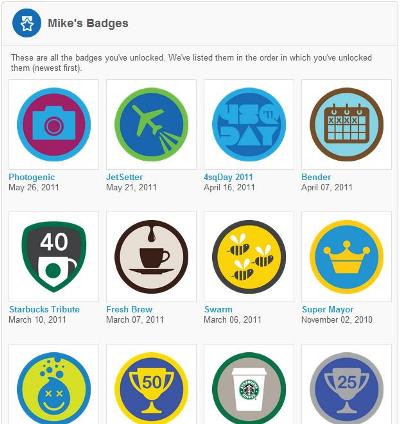
A personal favorite of mine, Foursquare is a location based social media tool with game elements. What does all that mean? Well, Foursquare allows users to “Check-in” to businesses and other venues using their smart phone’s GPS functionality. By “Checking-in,” users of the service let friends, via the service itself or by sharing on Facebook and / or Twitter. know where they are and why they are there. The game element comes from trying to rack up the most check-ins, and there by points and “badges,” than your friends. Users of the service can also compete with strangers for the title of “Mayor” of businesses or locations. The Mayor title does not mean anything other than bragging rights and more points when checking in. Badges can sometimes be difficult to get and so the competition can drive behavior. An example of this is the “Gym Rat” badge, that can only be achieved by checking in at a gym 10 times in 30 days.

Foursquare Badges

A selection of Foursquare badges

 Businesses can offer specials to Foursquare users when they check-in. Chilli’s, for example, offers free chips and salsa to anyone checking in on Foursquare – customers just show their smart phone to their server. Businesses may also reward the mayor of their business, making the title more coveted and therefore create competition around their brand.

 The grand theory of Foursquare is that it creates loyalty. If users have a choice between two businesses, one of whom there trying to become mayor of, they will choose that business or one is running a special for Foursquare users. Users of Foursquare can also leave tips, good and bad, about locations helping other users to choose where they might want to eat – for example. Because it is location based, it only offers places that are nearby, and allows the user to filter the results by type. This solves the information overload that can occur if smart phone users just trying to use Google.

Foursquare definitely has the potential to create a community of loyal users, and it has personal benefits (I use it to help keep track of my expenses!) However, the user base is small compared to other social media sites – particularly outside of major metropolitan areas. There are a number of other competitors in the location based world, the largest of whom is Facebook Places. The advantage of Facebook places is that it is part of Facebook, but it lacks a lot of the game elements that makes Foursquare fun and does not have the same controls on sharing.

Foursquare and other location based services have come under fire for the potential safety implications of letting your social media “friends” know where you are. This has been way overblown and as long as users are sensible, not creating a venue called “home” and checking into it for example, location based services will be around for a long time to come.

LinkedIn

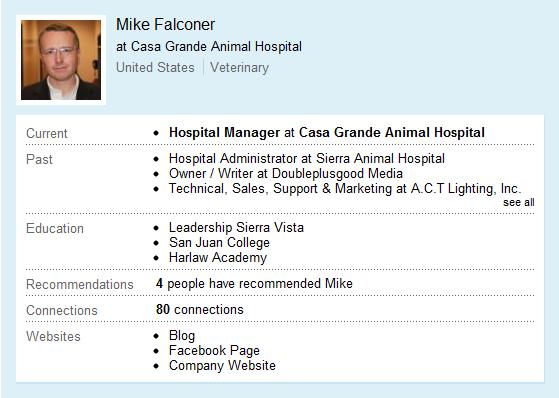
LinkedIn, is often called the professional Facebook and with good reason. Like Facebook, LinkedIn revolves around a profile. The difference is that your LinkedIn profile is essentially your resume. You can find mine here. Users of LinkedIn can then make connections with current, and former, colleagues to create a network. It is then possible to reach out to colleagues of colleagues more easily because you know which of your network knows them. LinkedIn has an introduction feature specifically for this. It is also possible to recommend, and get recommend, which also then appears on your profile.

Mike's LinkedIn Profile

Part of my LinkedIn Profile

Groups on LinkedIn are pretty much just like other web forums, but by being directly in LinkedIn it is possible to be a member of large numbers of different groups, on different subjects, without having to login to multiple sites. The additional functionality of being able to make connections that can help you professionally in the real world is obvious.

 A questions section does pretty much what you’d expect – allows for users to post questions and then other users to answer them. The advantage that LinkedIn has over other sites with a similar model, such as Quora, is that you are able to research the person giving the answer to see whether they know what they are talking about. You also then have a mechanism for connecting with them.

 A recent, and extremely innovative feature from LinkedIn has been news. This allows users to browse and share news items with their connections based on popularity within professional categories. It also allows users to share these news stories via Twitter – expanding the reach of your network yet again.

 LinkedIn does allow companies to have their own profiles, a bit like pages on Facebook, and this is interesting from a recruitment perspective. Groups are also being used successfully for recruitment and many feature a jobs section. LinkedIn also recently launched an “apply via LinkedIn” button that can be used for online job postings outside of the main LinkedIn site.

LinkedIn is a business to business tool (B2B), rather than the B2C tool that Facebook, Foursquare, and Twitter can be; however, don’t be surprised if LinkedIn does not become more and more a factor in recruitment of even minor posts in organizations. LinkedIn does have many issues (their mobile app is hopeless for anything other than news for example), but is a great professional tool for anyone interested in their career, or profession.

YouTube

YouTube is the video sharing site on the web and although being social it not at its core, it is still social media. Users uploaded material which they, and other users, can then share and comment on. Users can even create their own channels of material making it easier for other users to find similar videos. YouTube also has a number of great tools allowing you to embed a video directly into a website or blog. Video dramatically increases your website’s visibility to search engines, like Google and clients love it – a win all round!

Where YouTube really comes into its own, however, is that it is very easy for a video to go viral – spread around the internet like a virus. Of course, the video has to have some kind of merit; be funny, very dramatic, or even just be very bad, but if your brand is attached to this video it can be great publicity or almost zero cost. For example, it is not unusual for clips of TV shows on YouTube to have dramatically higher ratings that on the channels they were produced for!

Above is a great example of a viral pet video – 10 1/2 million views as of this writing and massive mainstream media attention for Denver’s owners. All from a video shot upon getting home and finding someone got into the cat treats!

 A great test of YouTube’s power is to pick any subject you like and search for a video on it at YouTube. Your are almost guaranteed that someone has shot and posted a video on that very subject. Thank you Corey for showing me this!

 Video production is really outside the realm of this already overly long post, but it is simple, very low cost and an extremely effective way to market your business.

Some of these social media tools may appeal to you, and other may not. There is definitely a take it or leave it feel to the services that we have talked about today but it is important to understand that to not be involved in social media, particularly Facebook, Twitter and to an extent Foursquare does not mean that your brand and business are not affected by these mediums. Your clients are using these tools and so might your competitors you should at least have an awareness of what is being said and why. The genie is out of the bottle and without getting involved, it is possible for you to loose influence over your brand – the control probably went some time ago as it is now the customer who ultimately defines what your brand means.

Next week, a change of pace: Up to your neck in traditional media!